
Download SlideFlow – AI‑Powered Presentation Builder, Free Trial, Secure & Fast
Overview & Key Features of SlideFlow AI
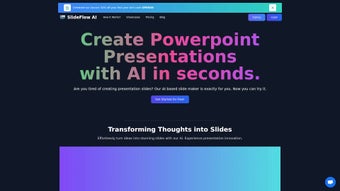
SlideFlow AI is a cloud‑native presentation creator that transforms raw text into polished PowerPoint decks in seconds. Built for professionals, educators, and teams that need high‑impact slides without spending hours on design, the platform runs entirely in the browser, eliminating the need for bulky installers or OS‑specific versions. Users simply log in, paste or upload content, and let the AI handle layout, visual selection, and branding consistency.
The free trial grants access to all core capabilities, including the “Magic Editor,” a massive library of over 500 templates, and support for more than 85 languages. SlideFlow’s subscription tiers scale storage from 5 GB to 200 GB, ensuring that both solo freelancers and large enterprises can find a plan that matches their workflow. Security is baked in with AES‑256 encryption, GDPR compliance, and optional two‑factor authentication, making the tool suitable for confidential business data.
In practice, SlideFlow reduces the time needed to create a professional deck from hours to minutes, while also offering collaborative editing, version history, and seamless export to PowerPoint, PDF, or shareable web links.
- AI‑Generated Slides: Convert outlines, bullet points, or full documents into fully designed slides with appropriate visuals and branding.
- Magic Editor: Instantly rewrite, expand, or re‑tone content while preserving intent, with a single click.
- Extensive Template Library: Over 500 industry‑specific templates and backgrounds, searchable by mood, color, and sector.
- Multilingual Support: Create presentations in 85+ languages, complete with automatic translation and locale‑aware design cues.
- Import & Export Flexibility: Bring in Word, Google Docs, or plain‑text files; export to .pptx, PDF, or live web link.
- Real‑Time Collaboration: Multiple users can edit simultaneously, with change tracking and comment threads.
- Secure Cloud Storage: Encrypted storage ranging from 5 GB to 200 GB, depending on the subscription tier.
- Continuous Updates: New templates, AI enhancements, and integrations are released monthly.
Installation & Usage Instructions
Getting Started – No Download Required
SlideFlow is delivered as a Software‑as‑a‑Service (SaaS) solution. To begin, visit slideflow.ai, click “Sign Up,” and create a free account using an email address or OAuth providers such as Google or Microsoft. After confirming the email, you land on a clean dashboard with a prominent “Create New Presentation” button.
Step‑by‑Step Workflow (≈5 Minutes)
- Select a Template: Choose a backdrop that matches your topic—business pitch, academic lecture, or creative portfolio.
- Import Content: Paste raw text, upload a .docx, .txt, or .md file. The AI parses headings, bullet points, and highlighted keywords.
- Generate Slides: Click “Generate.” Within seconds, SlideFlow builds a full deck with titles, bullet points, images, and transitions.
- Refine with Magic Editor: Review each slide. Use the “Edit” icon to ask the AI for alternative phrasing, additional data points, or visual tweaks. Changes appear instantly.
- Export or Share: Choose PowerPoint, PDF, or a shareable link that updates as you continue editing. For teams, enable real‑time collaboration and comment threads.
Power users can accelerate the process with keyboard shortcuts (e.g., Ctrl + E to open the Magic Editor) or integrate SlideFlow via an API key into internal tools or learning‑management systems. Because all heavy lifting occurs in the cloud, local hardware requirements are minimal—2 GB RAM and a stable 3 Mbps connection are sufficient for smooth operation.
Compatibility & System Requirements
As a browser‑based application, SlideFlow runs on any modern operating system that supports HTML5 and JavaScript. This includes Windows 10/11, macOS Catalina and later, recent Linux distributions, as well as mobile platforms such as Android 8.0+ and iOS 13+. Recommended browsers are Google Chrome, Microsoft Edge, Mozilla Firefox, and Apple Safari in their latest stable releases. Because processing happens in the cloud, the local machine only needs enough RAM (2 GB minimum) and a reliable internet connection (minimum 3 Mbps) to stream the UI smoothly.
For enterprises with strict security policies, SlideFlow offers Single Sign‑On (SSO) via SAML 2.0, two‑factor authentication, and GDPR‑compliant data handling. Premium plans also include an optional “Offline Mode” powered by a lightweight Electron wrapper, allowing users to edit existing decks without an internet connection; changes sync automatically when connectivity is restored.
In summary, whether you are on a corporate Windows PC, a MacBook, a Chromebook, or an iPad, SlideFlow delivers a consistent experience without additional plugins or drivers. Its responsive design adapts to various screen sizes, making it ideal for on‑the‑go presentations or collaborative sessions in conference rooms.
Pros, Cons, FAQ & Conclusion
Pros
- Lightning‑fast AI slide generation saves hours of manual design work.
- Huge library of 500+ professionally designed templates eliminates the need for third‑party assets.
- 85+ language support enables global collaboration.
- Real‑time collaboration and version history boost teamwork efficiency.
- Encrypted cloud storage with automatic backups ensures data security.
- Monthly updates keep features fresh and future‑proof.
Cons
- Subscription pricing may be steep for occasional users.
- Full functionality depends on a stable internet connection; offline mode is limited to higher‑tier plans.
- Advanced PowerPoint customizations (e.g., custom animations) still require manual tweaking after export.
- API integration has a learning curve for developers.
Frequently Asked Questions
Can I use SlideFlow for free?
Yes. SlideFlow offers a 7‑day free trial that includes all core features, the Magic Editor, and a limited amount of cloud storage. No credit card is required.
Is my data safe on SlideFlow’s cloud?
All files are encrypted at rest and in transit using AES‑256 and TLS 1.3. The service complies with GDPR, CCPA, and ISO‑27001 standards, and offers two‑factor authentication for added security.
Can I export slides to PowerPoint?
Absolutely. After generating a deck, you can download it as a .pptx file, a PDF, or share a live web link that updates automatically as you edit.
Does SlideFlow work on mobile devices?
The web app is fully responsive and works on Android and iOS browsers. Premium plans also include a native iOS app for offline editing.
How often are new templates added?
SlideFlow releases fresh template packs each month, based on user feedback and seasonal trends, ensuring your presentations stay current.
Conclusion – Should You Download SlideFlow?
SlideFlow AI delivers a compelling blend of speed, design quality, and multilingual capability that addresses the biggest pain points in presentation creation. The AI engine eliminates tedious layout work, while the Magic Editor and extensive template library give you creative control without hiring a designer. For freelancers, educators, sales teams, and corporate communicators, the subscription starting at $12 per month provides a cost‑effective alternative to purchasing multiple design tools and stock assets. The main drawbacks are the reliance on a stable internet connection and the premium price for occasional users.
If you value a secure, regularly updated tool that can turn a simple outline into a polished deck in minutes, SlideFlow is worth trying. Start your free trial today, explore the AI‑driven workflow, and decide whether the time saved justifies the subscription. A great presentation begins with great content—SlideFlow ensures that your content looks as impressive as it sounds.
SlideFlow AI impresses with rapid slide generation and an intuitive Magic Editor. While the pricing may deter occasional users, the productivity boost for frequent presenters is undeniable.


.png)



